
Withdraw INR from BLURT
There is no direct path to withdraw INR from Blurt tokens, so here I am sharing the steps to do. I have written previously also on the process and here are missing parts of the same.
Requirements
- Hive account
- Blurt account
- CoinDCXPro App with KYC
Process to Withdraw
1. Blurt Account and tokens
So, we need to have some liquid blurt to use. You can send your Blurt to TribalDex using the below guide.
https://blurt.blog/witness-discussion/@zahidsun/how-to-use-blurt-swap-to-buy-and-sell-blurt-on-tribaldex
After you send your Blurt to TribalDex, we now need to convert them. Let's move to the next step.
2. Exchange or Trade to Hive tokens
In the previous step, we got the SWAP.BLURT tokens which we need to convert to SWAP.HIVE tokens. There are basically two ways to convert
- Swapping (for small transactions)
- Trading (for large transactions)
Note: If you do not have any trading knowledge then swap is recommended or you may have a loss in trading because of wrong values.
a. Exchange With TribalDex Swap Pools
Tribaldex has created a number of swap pool pairs like SWAP.BLURT and SWAP.HIVE which you can use to swap tokens instantly.
Note: With swap, there is a slippage factor based on which the actually swapped tokens may be less than the shown amount
To do the swap, go to the link
https://tribaldex.com/dieselpools/
Select Pairs as shown in the image
- SWAP.BLURT as FROM
- SWAP.HIVE as To
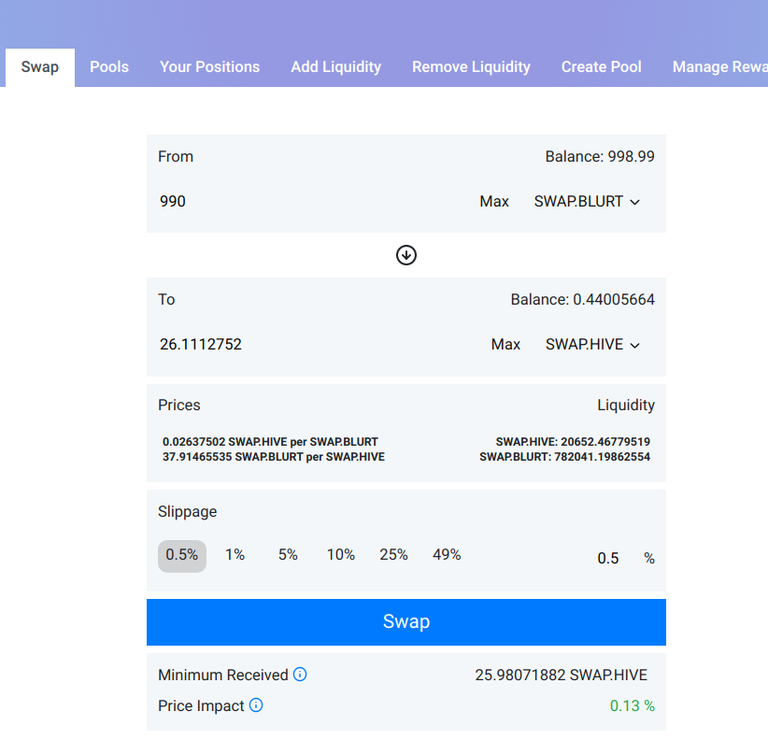
Here if you see for 990 SWAP.BLURT I will get the expected 26.11 SWAP.HIVE with a price impact of 0.13% with a minimum 25.98 SWAP.HIVE.
Note: While Swapping you need to take care you do small transactions with a low price impact.
Then click on Swap to initiate the swap process which will be done in 5 minutes or less, but in some cases, it might be slow so just wait.
b. Trade with SWAP.HIVE
Trading is a different process than swapping where we do create a market order for the exchange and it depends on the demand and supply so the prices may vary as per the market fluctuations.
Go to the below link
https://tribaldex.com/trade/SWAP.BLURT
Select Sell option and then order type as Market. Enter the quantity you want to sell and check the expected hive amount after converting.
Confirm the values and click Sell. You will soon get SWAP.HIVE in your wallet.
Note: Limit order is when you want to trade at expected prices and the market is the current price. A market order will be done faster and guaranteed but the limit orders may or may not happen and will be slow.
check image for reference
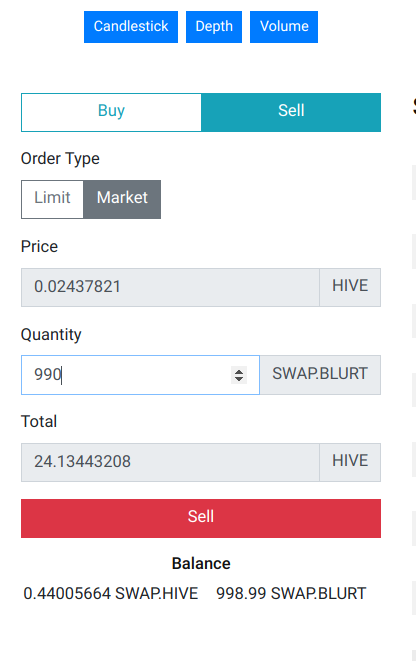
Note: The prices of swap vs trade vary with different amounts and different times, so better to check both before doing anything.
From this step, we get the required SWAP.HIVE which we will send to hive wallet.
3. Swap Process to TRON with CoinDCX and Hive wallet
As we got SWAP.HIVE from the previous step now we need to convert them to hive tokens and then swap them to TRON tokens in the CoinDCXPro App.
I have already shared two guides here for the same process.
Using Letsexchange Website
Using SimpleSwap Mobile App
So, following any one of the above steps, you will get TRON in your wallet.
4. Sell TRON to INR
So, now go to CoinDCXPro App and click on DCXInsta. Then select TRON coin and enter the amount to sell like I shared in the screenshot.
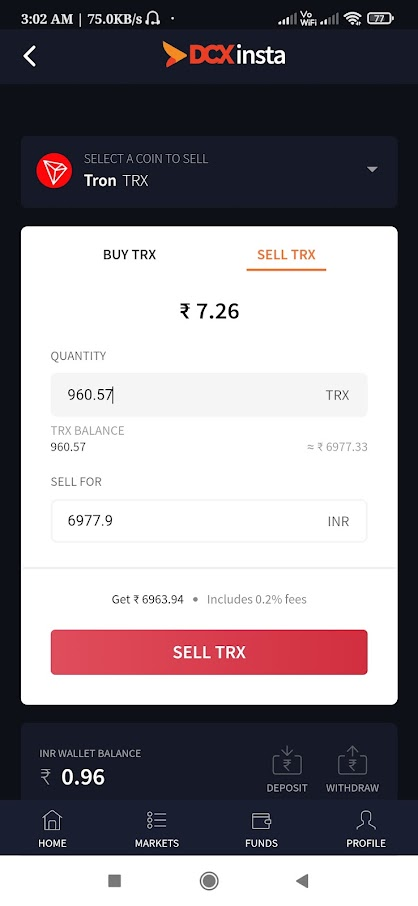
After the Sell order is done you will get the money in your INR balance. Now you can do a withdraw to your KYC bank account.
Congrats, now you have finished all steps to withdraw INR from Blurt token.
Note: I have done this for INR but other steps are the same, you can sell TRON in your own currency to get that to your bank account following the same steps.
How To Swap Coins with LetsExchange Website
How to Swap Tokens with SimpleSwap Mobile App
You can support me by giving a vote to my Blurt Witness as I am doing dev work, Hosting an RPC, and now frontend.
https://blurtwallet.com/~witnesses?highlight=tekraze
Follow me on my social networks
Tekraze Blog
Instagram Personal
Instagram Blog account
Instagram Gaming Account
Youtube Gaming
DTube
Tekraze on Medium
Dehazelabs on Medium
Dev.to
Hashnode
Noise
Hive
Steemit
Serey
Cross Posted from https://blurt.blog/blurt/@tekraze/how-to-withdraw-inr-from-blurt-using-swap-or-swapping-guide-3-by-techclub-or-07-jan-2022


Glad to see you in Serey. I follow you to blurt. Your developing work is really admirable.
Yes bro I am from India
Have a wonderful witness journey.
Are you indian, right? I heard about you from Zahid brother and Ytyeasin brother.